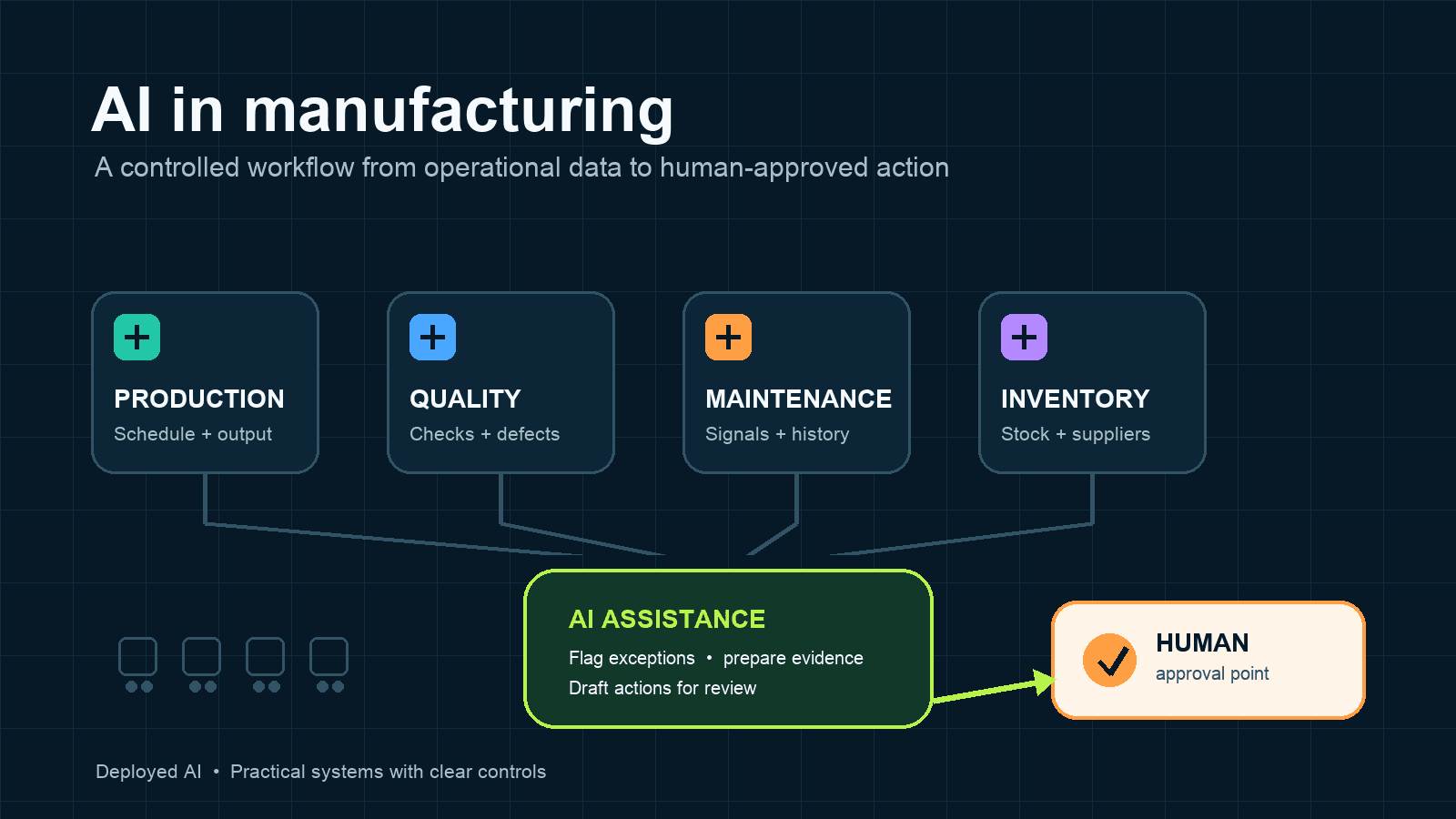
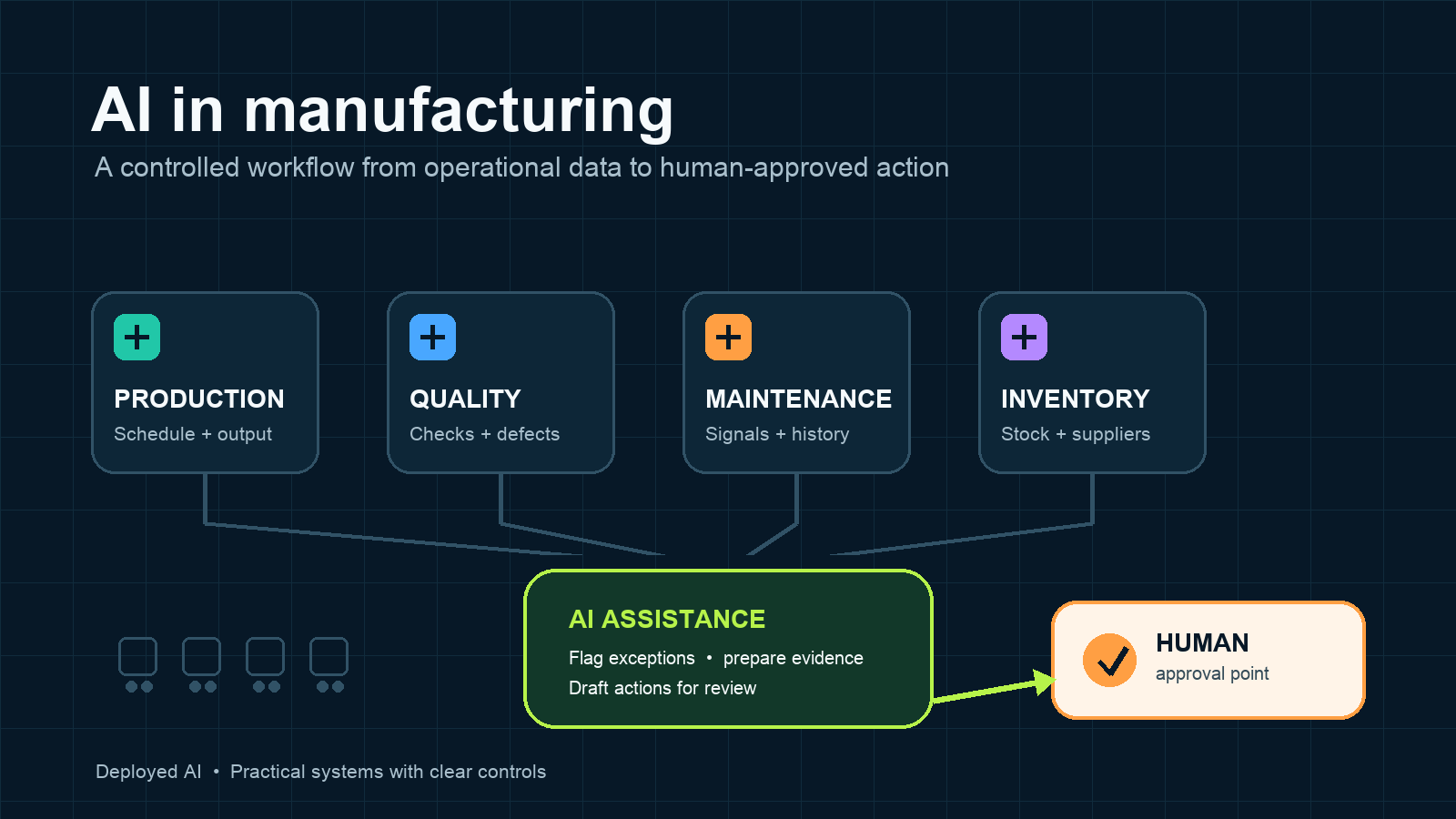
AI in manufacturing works best when it helps people detect exceptions, prepare decisions and reduce repeated handling across production, maintenance, quality, inventory and supplier workflows. Australian manufacturers should start with one measurable process, connect only the information it needs and keep qualified people responsible for safety, quality and production decisions.
A practical first project might classify downtime notes, prepare a daily exception report or check supplier documents for missing fields. It should not control machinery, release product or change a production schedule without appropriate review.
Key takeaways:
- Start with an information workflow around production, not autonomous control of production equipment.
- Use approved operational data and show the source beside each recommendation.
- Keep people responsible for safety, quality, maintenance and customer commitments.
- Test normal jobs, missing data and unusual conditions before wider rollout.
- Measure corrections, missed exceptions and review effort as well as time saved.
Contents
- How is AI used in manufacturing?
- Which manufacturing workflow should you automate first?
- Can AI improve quality control?
- How does AI support predictive maintenance?
- Can AI help with production planning and inventory?
- What are the main risks of AI in manufacturing?
- How should manufacturers protect operational data?
- How do you run a controlled manufacturing AI pilot?
- How do you measure whether the project works?
- Frequently asked questions
How is AI used in manufacturing?
AI is used in manufacturing to classify records, detect unusual patterns, forecast demand, inspect products, search technical information and prepare operational actions. The strongest use cases have reliable source data, a narrow task and a clear person responsible for the result.
Practical applications include:
- grouping downtime notes by likely cause for maintenance review
- flagging unusual sensor readings or production results
- preparing inspection summaries from approved quality records
- checking supplier documents against required fields
- extracting part numbers, dates and quantities from varied documents
- drafting shift handover and production exception reports
- forecasting demand or inventory requirements for planner review
- finding relevant work instructions and maintenance history
These systems do different jobs. A language model might turn free-text operator notes into a structured report. A computer vision model might flag a possible surface defect. A forecasting model might estimate future demand from historical orders. Treating every system as one generic AI tool makes testing and accountability harder.
The Australian Bureau of Statistics reported that 12% of Australian businesses used AI in 2024–25, compared with 1% in 2021–22. The same release says the question measures whether AI was used, not how extensively it was used or whether it created value. Manufacturers still need evidence from their own process.
Which manufacturing workflow should you automate first?
For most manufacturers, the best first AI workflow is a repeated information task that supports production without directly controlling machinery. Daily exception reporting, maintenance-note triage and supplier-document checking are good candidates because staff can compare the result with a source.
| Workflow | Useful AI contribution | Human responsibility |
|---|---|---|
| Downtime reporting | Classify notes, identify recurring themes and prepare a review list | Confirm the cause and choose corrective action |
| Quality records | Summarise inspections and flag results outside defined limits | Decide product disposition and quality action |
| Maintenance planning | Prioritise signals and retrieve relevant service history | Diagnose the asset and approve maintenance work |
| Supplier documents | Extract fields and identify missing or conflicting information | Resolve discrepancies and approve changes |
| Production reporting | Combine approved records into a shift or daily summary | Verify events, constraints and commitments |
| Inventory exceptions | Flag unusual consumption, shortages or duplicated records | Investigate the reason and approve stock action |
Choose a process with enough volume to measure, but low enough consequence to test safely. Define what the system may read, draft and recommend. Also define what it must never approve or change.
A fixed software rule is often better when the input is structured and the correct response never varies. AI earns its place when information arrives in different formats or a pattern needs interpretation, while the output can still be checked.
Our guide to AI workflow automation explains how to map the trigger, inputs, output, approval point and exception path before connecting business systems.
Can AI improve quality control?
AI can improve quality control by helping inspectors find patterns, review images or sensor data and prepare consistent records. It should support the approved quality process, not quietly replace specifications, sampling plans or authorised decisions.
Computer vision can be useful where a repeatable visual feature distinguishes an acceptable item from a possible defect. The model needs representative images from the actual product, equipment, lighting and production conditions. A demonstration trained on ideal images is not proof that the system will work on a busy line.
Before using an AI inspection result, test:
- known acceptable products
- confirmed examples of each relevant defect
- borderline cases that qualified staff find difficult
- different batches, shifts, lighting and equipment settings
- missing, obscured or poor-quality images
- new products or process changes the model has not seen
Track false negatives and false positives separately. A false negative may let a defect pass. A false positive may create reinspection, scrap or unnecessary stoppages. The acceptable rate depends on the product, customer requirements and consequences of an error.
Keep inspection evidence linked to the product, batch, equipment and model version. If performance changes, staff should be able to trace what the system saw and which rule or model produced the flag.
How does AI support predictive maintenance?
AI supports predictive maintenance by finding patterns in condition data and maintenance history that may indicate deterioration. Useful inputs can include vibration, temperature, current, pressure, runtime, alarms, work orders and operator observations.
The output should usually be a ranked review list or maintenance recommendation, not an automatic diagnosis. The same signal can have several causes, while missing or poorly calibrated sensors can create convincing but incorrect patterns.
A practical maintenance workflow can:
- collect approved condition readings and recent alarms
- compare them with normal operating ranges and historical behaviour
- retrieve related work orders and known failure modes
- flag an asset for qualified review
- prepare a draft inspection task with the supporting evidence
- record the technician's finding for future evaluation
Start with an asset where unplanned downtime matters, enough historical data exists and maintenance staff can verify outcomes. Do not begin with every machine. A narrow trial makes it easier to tell whether the system found useful warnings or merely repeated obvious alarms.
Compare AI-assisted recommendations with a simple baseline, such as threshold alerts or planned inspection intervals. If the AI approach does not improve warning quality, planning time or avoidable downtime, the extra complexity may not be justified.
Can AI help with production planning and inventory?
AI can help planners prepare forecasts, identify constraints and model possible schedules. It cannot repair inaccurate bills of materials, late stock movements or inconsistent lead times. Data quality usually limits the result before model sophistication does.
Useful planning inputs may include:
- confirmed orders and forecast demand
- bills of materials and routings
- available labour, equipment and tooling
- run rates, changeover times and batch rules
- current inventory and expected receipts
- supplier lead times and minimum quantities
- maintenance windows and known capacity constraints
Use the system to propose options and explain the records behind them. A planner should review high-value orders, customer priorities, material substitutions, overtime, subcontracting and commitments that affect delivery.
The ABS found that 59% of Australian businesses reported supply chain disruptions in 2024–25, while 15% said supply chain issues significantly hampered activity or performance. AI cannot remove external disruption. It may help a manufacturer identify affected orders sooner and prepare options from current information.
Measure schedule adherence, stockouts, expedites, excess inventory and planner effort. A forecast that is statistically accurate but cannot be acted on within purchasing or production constraints has limited value.
What are the main risks of AI in manufacturing?
The main risks are unsafe reliance, poor data, hidden model errors, excessive system access and unclear responsibility. The risk grows when an AI output can change equipment, release product, order materials or make a customer commitment before a person checks it.
Unsafe or unsupported actions
Do not let a general-purpose model alter machine settings, bypass an interlock or decide that an unsafe condition is acceptable. Keep existing engineering, safety and quality controls in place. Any AI recommendation that affects physical operations needs review by an authorised person.
Confident errors
Generated explanations can sound certain even when a source is missing or records conflict. Require the system to show its evidence, identify uncertainty and stop when required information is unavailable.
Poor operational data
Duplicate part numbers, missing downtime codes, inconsistent units and delayed transactions can produce a precise-looking mistake. Repair the source process before automating decisions built on it.
Model drift and process change
Equipment, products, suppliers and operating conditions change. Re-test after relevant changes and monitor performance by product, asset and operating condition rather than relying on one overall accuracy figure.
Unclear accountability
Name an owner for the workflow, its data and its operating limits. Staff need to know who can change instructions, approve access, review incidents and pause the system.
Australian Government guidance for AI adoption recommends accountability, impact assessment, risk management, disclosure, testing, monitoring and meaningful human control. Apply those practices in proportion to the consequence of the manufacturing task.
How should manufacturers protect operational data?
Manufacturing systems can contain product designs, recipes, process parameters, customer orders, supplier terms, maintenance records and information about staff. Connect only the data required for the chosen workflow.
Before deployment, document:
- the exact systems, tables, folders and devices the AI can access
- whether data leaves the business environment and where it is retained
- whether prompts, files or outputs can be used to train a provider's models
- who can change instructions, integrations and permissions
- which actions need approval and which are prohibited
- how activity, errors and access changes are logged
- how the system can be paused, rolled back and removed
Use business accounts, role-based access and multifactor authentication. Separate development and testing from live production. Remove credentials and sensitive fields from prompts unless the task genuinely requires them.
The Australian Signals Directorate's guidance on deploying AI systems securely recommends adapting controls to the use case and threat profile. It also emphasises governance, secure configuration, access controls, monitoring and maintenance. Those controls should sit alongside the manufacturer's existing cybersecurity and operational technology rules.
How do you run a controlled manufacturing AI pilot?
Run the pilot on one workflow, with one accountable owner and a defined decision date. Keep the existing process available until the new workflow meets agreed performance and safety requirements.
- Define the problem. Record the current trigger, inputs, output, owner and pain point.
- Measure the baseline. Capture volume, handling time, delays, errors and rework.
- Set the boundary. State what the system may read, recommend, draft and never do.
- Prepare the data. Fix missing identifiers, units, labels and obvious duplicates.
- Build test cases. Include normal work, missing data, conflicts and rare conditions.
- Start read-only. Compare recommendations with real decisions before allowing changes.
- Require review. Show evidence and capture whether staff accepted, changed or rejected the result.
- Decide from evidence. Expand, revise or stop based on quality, risk and total effort.
Do not judge the pilot from its best examples. Review a defined sample, including failures and cases where the correct result was to escalate or do nothing.
If the workflow crosses email, documents, ERP, maintenance or inventory systems, a managed implementation may be more suitable than another standalone interface. Deployed AI's managed AI services connect selected workflows to approved business tools, with setup, team training and ongoing Australian support.
How do you measure whether the project works?
Measure the full process, including staff review and correction time. A faster draft is not a saving if a technician, planner or quality manager must reconstruct the evidence before trusting it.
Useful measures include:
- median handling time before and after the change
- percentage of outputs accepted without material correction
- false-negative and false-positive rates where applicable
- exceptions escalated correctly and exceptions missed
- downtime, scrap, rework or expedites connected to the workflow
- staff time spent reviewing and maintaining the system
- incidents, near misses and customer complaints
- total software, integration and support cost
For a reporting workflow, calculate the weekly volume multiplied by verified minutes saved, then subtract review and maintenance time. For a predictive workflow, compare warnings with confirmed findings and a simple baseline. Avoid claiming savings from recommendations that staff could not use.
Review results by product, line, asset and shift where the sample is large enough. An average can hide poor performance in a smaller but important category.
When is AI the wrong choice for a manufacturer?
AI is the wrong starting point when the process is unstable, source records are unreliable or nobody owns the final decision. It is also unnecessary when a standard report, software rule, barcode, sensor threshold or ordinary integration solves the problem more reliably.
Delay deployment if the business cannot test representative cases, explain where its data goes or stop the workflow safely. Improving work instructions, master data or system discipline may deliver more value first.
The best technology is the simplest one that meets the requirement. AI should earn its cost and added risk through measured performance in the actual process.
Where should an Australian manufacturer start?
Start by observing one repeated workflow for a week. Count its volume, identify the source information, record where staff wait or re-enter data and nominate the person responsible for approval. Choose a task where mistakes can be found before they affect machinery, product or customers.
Test with historical examples before connecting live actions. If the system saves measurable time while preserving quality and control, expand one boundary at a time.
For help selecting and testing a suitable first workflow, book a free 30-minute AI audit.
Frequently asked questions
What is AI in manufacturing?
AI in manufacturing is software that uses data to classify information, detect patterns, forecast outcomes or prepare actions across production and supporting operations. It can assist with quality, maintenance, planning, inventory and administration, but people should remain responsible for consequential decisions.
What is the best first AI project for a manufacturer?
The best first project is usually a repeated information workflow with reliable data and a clear reviewer. Daily exception reporting, maintenance-note triage or supplier-document checking are safer starting points than direct control of production equipment.
Can AI predict machine failures?
AI can identify patterns that may indicate deterioration, but it cannot guarantee a failure prediction. Use it to support qualified maintenance review, compare it with simple alert baselines and track confirmed findings, missed events and false alarms.
Can AI inspect manufactured products?
Computer vision can flag possible defects when it is trained and tested on representative images from the real process. Quality staff should verify performance across products and operating conditions, then retain responsibility for release, rejection and corrective action.
How much does manufacturing AI cost?
Cost depends on the workflow, data preparation, equipment or software connections, user numbers, testing and ongoing support. Compare the total cost with measured handling time, downtime, scrap, rework or planning outcomes from a narrow pilot before expanding.